它能做什么
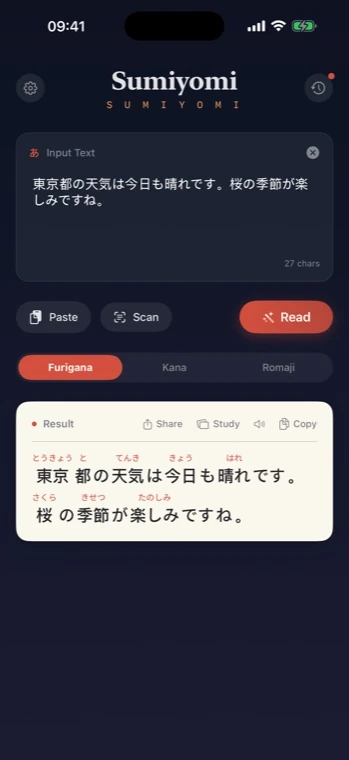
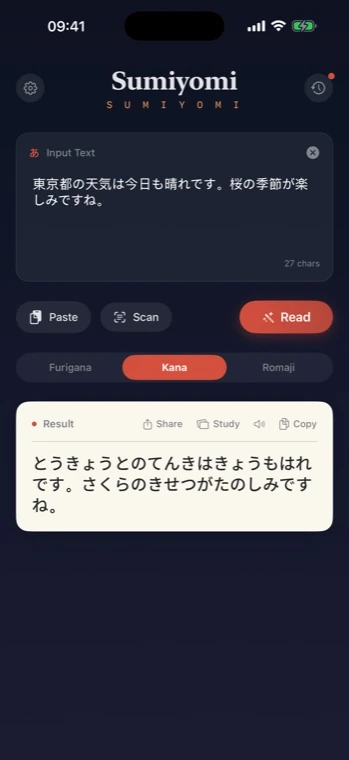
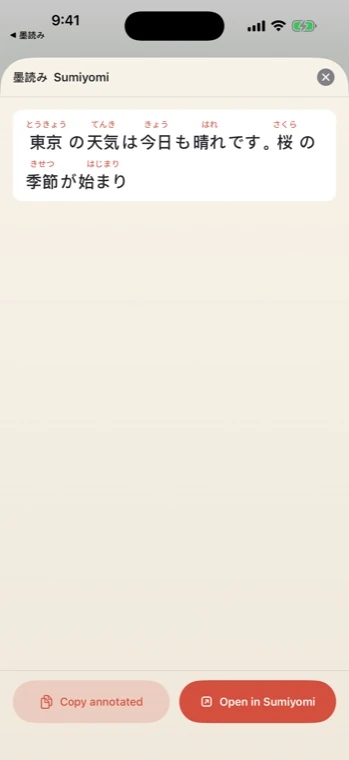
Sumiyomi 让阅读日语更轻松。复制句子、粘贴到 App、点击读取,就能在汉字上方看到清晰的读音。你也可以切换假名或罗马字,扫描图片文字,听日语朗读,并把单词保存到卡片里复习。
- 完全离线的日语文本处理
- ふりがな、かな、罗马字显示模式
- 支持照片、截图和漫画页面 OCR
- 日语朗读与实时单词高亮
- 收藏单词和单词卡复习
- 主屏幕与锁屏小组件
- 历史搜索与 CSV 导出
- 可选的私有 iCloud 同步
为什么做它
我做 Sumiyomi,是为了给日语学习、旅行、翻译和漫画阅读准备一个干净的小工具:无广告、无账号、尽量离线,把重点放在“看懂这段文字”上。
重视隐私
没有分析、没有追踪,也没有用于处理文本的 App 服务器。
为学习而做
收藏常查单词、复习卡片,并保持稳定的阅读节奏。
原生 iOS 体验
SwiftUI App,支持分享扩展、小组件和 VoiceOver。
v4.4.0
Latest
v4.4.0
简体中文
v4.4.0
- 从当前页选择多个词语,一次保存原句卡片。
- 支持材料改名、卡片移动和连续补充释义。
- 复习时可切换同一词语的原句,并编辑当前原句的释义。
- 改进编辑器的保存、关闭操作,以及窗口尺寸变化时草稿的保留。
- 如果遇到问题或有任何想法,欢迎前往“设置”点击“发送反馈”
日本語
v4.4.0
- 今のページから複数の単語を選び、原文カードをまとめて保存できます。
- 教材名の変更、カードの移動、意味の連続入力に対応しました。
- 復習中に同じ単語の例文を切り替え、文ごとの意味を編集できます。
- 編集画面の保存・閉じる操作と、画面サイズ変更時の入力内容の保持を改善しました。
- ご意見やご要望、不具合がありましたら、設定の「フィードバックを送信」からお知らせください
English
v4.4.0
- Select several words from the current page and save their context cards together.
- Rename materials, move cards between materials and fill in meanings one after another.
- Switch between sentences for the same word during review and edit the current sentence’s meaning.
- Improved editor Save and Close controls and draft preservation when the window size changes.
- If you run into a problem or have an idea, tap Send Feedback in Settings.
v4.3.1
v4.3.1
简体中文
v4.3.1
- 修复设备处于静音模式时“朗读”没有声音的问题。
- 减少文本解析与学习材料显示时的重复处理。
- 如果遇到问题或有任何想法,欢迎前往“设置”点击“发送反馈”
日本語
v4.3.1
- 消音モードがオンのとき、「読み上げ」で音声が出ない問題を修正しました。
- 読書画面と学習資料の表示で繰り返し行っていた処理を削減しました。
- ご意見やご要望、不具合がありましたら、設定の「フィードバックを送信」からお知らせください
English
v4.3.1
- Fixed Read aloud playing no sound when Silent mode is on.
- Reduced repeated processing during text annotation and study material display.
- If you run into a problem or have an idea, tap Send Feedback in Settings.
v4.3.0
原句也能留下来复习
简体中文
原句也能留下来复习
- 保存单词的原句和文档页码,添加自己的释义与笔记。
- 按材料整理卡片,在原句中复习到期单词。
- 导出供桌面版Anki导入的文本。
- 免费可保存10张原句卡片;Premium可不受此上限继续添加,到期后已有卡片仍可使用。
日本語
読んだ文を学習カードへ
- 単語を元の文や文書のページと一緒に保存し、自分の意味やメモを追加できます。
- 教材ごとに整理し、元の文を見ながら期限の来た単語を復習できます。
- パソコン版Anki用のテキストを書き出せます。
- 原文カードは無料で10枚まで。Premiumでは枚数制限なく追加できます。保存済みカードは期限が切れても利用できます。
English
Keep the sentences you read
- Save words with their original sentences and document page references, plus your own meanings and notes.
- Organize cards by material and review due words in context.
- Export cards as text for desktop Anki.
- Keep up to 10 context cards for free. Premium allows additional cards without this cap; existing cards remain usable after expiry.
App Store Connect 链接